The Djibouti eVisa system does not require a traditional username-and-password login. Instead, applicants access their eVisa account, track application status, and download approved visas through the official portal using their application reference number and registered email address. This streamlined approach means you do not need to remember login credentials or create a separate account profile.
This guide explains exactly how to access your Djibouti eVisa account, track your application, download your approved visa, and troubleshoot common access issues.
How the Djibouti eVisa Access System Works
Unlike many eVisa portals that require account registration with a username and password, the Djibouti eVisa system uses an email-based access model. When you submit your visa application, the portal generates a unique reference number tied to your email address. You use this combination to check your application status and retrieve your approved eVisa.
This system eliminates the need to remember login credentials, reset forgotten passwords, or manage yet another online account. Your application reference number serves as your access key throughout the entire visa process.
What You Need to Access Your eVisa Account
To log in and access your Djibouti eVisa account, have the following ready:
- Application reference number – Provided immediately after submitting your application (format typically includes letters and numbers, e.g., DJB-XXXXXX)
- Registered email address – The email you used when filling out the application form
- Passport number – May be required as an additional verification step
If you applied through a visa agency or third-party service, check your confirmation email from that provider, as they may use their own reference numbers alongside the official one.
Step-by-Step: How to Access Your Djibouti eVisa Account
Step 1: Visit the Official eVisa Portal
Open your web browser and navigate to the official Djibouti eVisa portal at djibouti-evisa.com. The portal is accessible from any device – desktop computer, tablet, or smartphone – and works with all major browsers including Chrome, Firefox, Safari, and Edge.
Ensure you are on the official portal and not a phishing site. Check that the URL bar shows a secure connection (padlock icon and https:// prefix).
Step 2: Navigate to the Application Tracking Section
On the portal homepage, locate the “Application Tracking” or “Check Status” option. This is typically found in the main navigation menu or as a prominent button on the homepage. The tracking tool allows you to access your application without logging into a separate account.
Step 3: Enter Your Reference Number and Email
In the tracking form, enter:
- Your application reference number exactly as it appears in your confirmation email
- The email address you used during the application process
Double-check both fields for typos. The reference number is case-sensitive on some portals, so enter it exactly as shown in your confirmation email.
Step 4: View Your Application Status
After submitting the form, you will see your current application status. Djibouti eVisa applications typically display one of the following statuses:
| Status | Meaning |
|---|---|
| Submitted | Your application has been received and is awaiting review |
| Under Review | Visa experts are verifying your documents and information |
| Additional Documents Required | You need to upload missing or updated documents |
| Approved | Your eVisa has been granted and is ready for download |
| Rejected | Your application was not approved (reason provided) |
Step 5: Download Your Approved eVisa
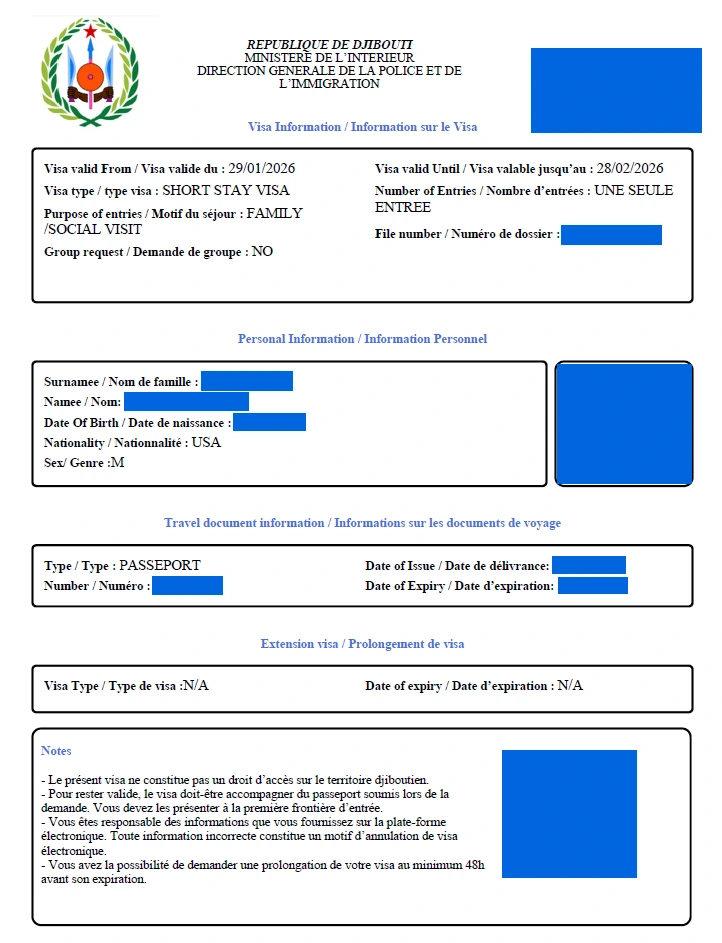
Once your application status shows “Approved”, you will have the option to download your eVisa as a PDF document. Download and save this file to your device. Print at least two copies – one for your carry-on bag and one as a backup.
Your eVisa PDF contains your full name, passport number, visa type, validity dates, and a barcode or QR code for immigration verification upon arrival in Djibouti.
Accessing Your eVisa via Email
In addition to the portal tracking tool, you receive automatic status updates by email at every stage of the process. When your eVisa is approved, the confirmation email includes:
- Your approved eVisa as a PDF attachment
- A summary of visa details (type, validity, stay duration)
- Instructions for arrival in Djibouti
- A link to the portal for future access
Check your inbox, spam, and junk folders for emails from the eVisa portal. Add the sender address to your contacts to ensure future emails arrive in your inbox.
How to Track Your Djibouti eVisa Application Status
Tracking your application is straightforward using the methods described above. However, here are additional tips to stay informed:
Email Notifications
The portal sends automatic email notifications when your application status changes. You receive emails when:
- Your application is submitted successfully
- Your documents are under review
- Additional documents are required
- Your eVisa is approved or rejected
Check Frequency
Standard processing takes 4-7 working days. Rush processing takes 3-5 working days, and Super Rush processing takes 2-4 working days. Avoid checking multiple times per day during the standard processing window, as status changes are not instantaneous.
If your application has exceeded the expected processing time, contact visa support via email at [email protected] or through the portal’s live chat feature.
What to Do If You Cannot Access Your eVisa Account
Lost Reference Number
If you have lost your application reference number:
- Check your email – Search for emails from the eVisa portal or djibouti-evisa.com. The reference number is in the initial confirmation email.
- Check spam/junk folders – Confirmation emails sometimes land in spam.
- Contact support – Reach out to the visa support team with your full name, passport number, email address, and approximate application date. They can retrieve your reference number.
Wrong Email Address Used
If you entered an incorrect email during your application:
- Contact visa support immediately with your reference number and correct email
- Provide your passport number and full name for verification
- Support will update your contact information and resend confirmation emails
Application Not Found
If the portal returns “Application Not Found”:
- Verify the reference number has no extra spaces or characters
- Ensure you are using the exact email from the application
- Wait 24 hours after submission before tracking (initial processing delay)
- If the issue persists, contact support with your payment receipt or transaction ID
Accessing Your eVisa on Mobile Devices
The Djibouti eVisa portal is fully mobile-responsive. You can access your account, track your application, and download your approved eVisa from any smartphone or tablet. The process is identical to desktop access:
- Open your mobile browser (Chrome, Safari, or any browser)
- Navigate to the eVisa portal
- Enter your reference number and email
- View status or download your eVisa
For convenience, save the eVisa PDF to your phone’s document storage and also email it to yourself as a backup. Immigration officers in Djibouti accept printed copies, but having a digital version on your phone provides an extra layer of security.
Security Tips for Your eVisa Account
Protect your eVisa information with these best practices:
- Never share your reference number publicly or on social media
- Download your eVisa on a secure network – avoid public Wi-Fi when accessing the portal
- Save the PDF securely – use password-protected storage if available
- Print backup copies – carry at least two printed copies when travelling
- Verify the portal URL before entering your details – always check for https:// and the correct domain name
- Delete old emails containing your reference number after your trip is complete
Related Guides
- Djibouti eVisa: Complete Guide to the Electronic Visa
- Djibouti Visa Application: How to Apply Online
- Djibouti Visa Requirements: Documents and Eligibility
- Djibouti Visa Fee: How Much Does It Cost?
- Djibouti Visa Processing Time: How Long?
Frequently Asked Questions
Do I need to create a login account for the Djibouti eVisa?
No. The Djibouti eVisa system does not require account registration with a username and password. You access your application using your reference number and email address. This means there is no account to create, no password to remember, and no profile to manage.
How do I find my Djibouti eVisa reference number?
Your reference number is sent to your email immediately after you submit your application. It appears in the confirmation email from the eVisa portal. If you cannot find it, check your spam or junk folder. As a last resort, contact visa support with your passport number and full name.
Can I check my eVisa status without the reference number?
The reference number is required to access your application through the portal tracking tool. However, you will still receive status update emails at your registered email address regardless of whether you use the tracking tool. If you have lost your reference number, contact support for assistance.
How long does it take for my eVisa status to update?
Status updates are reflected in real time on the portal. However, the processing itself takes 2-7 working days depending on the speed option you selected. Checking the portal multiple times per day will not speed up the process.
Can someone else check my eVisa status for me?
Yes. Anyone with your reference number and registered email address can check your application status on the portal. However, only you can download the approved eVisa PDF, as it is linked to your passport. For security reasons, share this information only with trusted individuals.
What if my eVisa application was rejected?
If your application is rejected, the portal displays the reason for rejection. Common reasons include incorrect document uploads, passport validity issues, or incomplete information. You can submit a new application after correcting the issues. The visa fee for the rejected application is typically not refundable.
Is there a mobile app for the Djibouti eVisa?
There is no dedicated mobile app. The eVisa portal is a web-based platform that works on all devices through any browser. You do not need to download anything to access your account or track your application.
Can I change my email address after submitting my application?
Yes. Contact visa support with your reference number, passport number, and the new email address. Support will update your contact information so that future notifications are sent to the correct address.